

The mobile application market continues to grow rapidly, and businesses today are looking for faster, cost-effective ways to build high-quality Android and iOS applications. Among the many frameworks available, React Native has remained one of the most trusted technologies for cross-platform development. However, one question still creates confusion for startups, developers, and business owners alike:
Should you choose React Native CLI or Expo?
While both options are built around the React Native ecosystem, they are designed with different goals in mind. Expo focuses on simplifying development by providing a managed environment with built-in tools, whereas React Native CLI offers complete flexibility and direct access to native Android and iOS projects.
Choosing the wrong approach can impact your project’s scalability, development timeline, performance, maintenance costs, and future upgrades. That’s why understanding the strengths and limitations of each platform is essential before starting your application.
At KAD InfoTech, we help businesses build scalable, secure, and high-performing mobile applications using the latest React Native technologies. Depending on the project requirements, our developers carefully evaluate whether Expo or React Native CLI is the better fit to ensure long-term success instead of short-term convenience.
In this comprehensive comparison, we’ll examine both development approaches, explore their differences, compare performance, discuss real-world use cases, and help you determine which solution aligns with your business goals in 2026.
Understanding React Native
Before comparing React Native CLI and Expo, it’s important to understand what React Native actually is.
React Native is an open-source framework developed by Meta that allows developers to create native mobile applications using JavaScript and React. Instead of maintaining separate codebases for Android and iOS, developers can write a significant portion of the application once and deploy it across both platforms.
Unlike hybrid frameworks that rely heavily on web views, React Native renders genuine native UI components, resulting in applications that feel much closer to fully native experiences.
Over the years, React Native has evolved significantly with improvements such as the New Architecture, Fabric Renderer, TurboModules, and better JavaScript engines like Hermes. These advancements have improved application startup time, rendering performance, and overall responsiveness, making React Native a preferred choice for companies ranging from startups to Fortune 500 enterprises.
Today, businesses across industries—including healthcare, finance, logistics, eCommerce, education, and social media—are leveraging React Native to reduce development costs while maintaining an excellent user experience.
What is React Native CLI?
React Native CLI is the official development environment provided by the React Native community. It gives developers complete control over every aspect of their application, including the Android and iOS native projects.
Unlike managed solutions, React Native CLI generates actual native folders that can be modified whenever needed. Developers can install custom native libraries, configure Gradle or Xcode settings, integrate proprietary SDKs, and optimize performance without platform restrictions.
This level of flexibility makes React Native CLI particularly suitable for enterprise applications and feature-rich products that require extensive native integrations.
Some common use cases include:
- Banking and fintech applications
- Healthcare platforms
- Enterprise management systems
- IoT applications
- AI-powered mobile solutions
- AR/VR applications
- Custom Bluetooth integrations
- NFC-enabled applications
- Payment gateway integrations
- Complex background processing
Although React Native CLI offers unmatched flexibility, it also introduces additional complexity. Developers are responsible for setting up Android Studio, Xcode, SDKs, simulators, certificates, provisioning profiles, and native dependencies.
For experienced development teams, these responsibilities are manageable. However, beginners often face a steeper learning curve compared to managed development environments.
What is Expo?
Expo is a development framework built on top of React Native that simplifies the process of building, testing, deploying, and maintaining mobile applications.
Instead of requiring developers to configure native Android and iOS environments from the beginning, Expo provides a managed workflow where most development tasks work immediately after installation.
This allows developers to spend less time on configuration and more time building application features.
Expo includes an extensive collection of built-in APIs covering common mobile functionalities such as:
- Camera access
- Push notifications
- Device sensors
- File management
- Secure storage
- Authentication
- Location services
- Image picker
- Audio recording
- Barcode scanning
- Deep linking
- OTA (Over-the-Air) updates
One of Expo’s biggest strengths is its development experience. Developers can instantly preview applications using the Expo Go app without repeatedly generating native builds, significantly reducing development time during the early stages of a project.
Over the past few years, Expo has evolved beyond being just a beginner-friendly framework. With tools like Expo Prebuild, Expo Router, EAS Build, EAS Submit, and EAS Update, it has become a mature platform capable of supporting many production-grade applications.
As a result, many startups and product companies now choose Expo for rapid development while still retaining the option to migrate to a more customized workflow when needed.
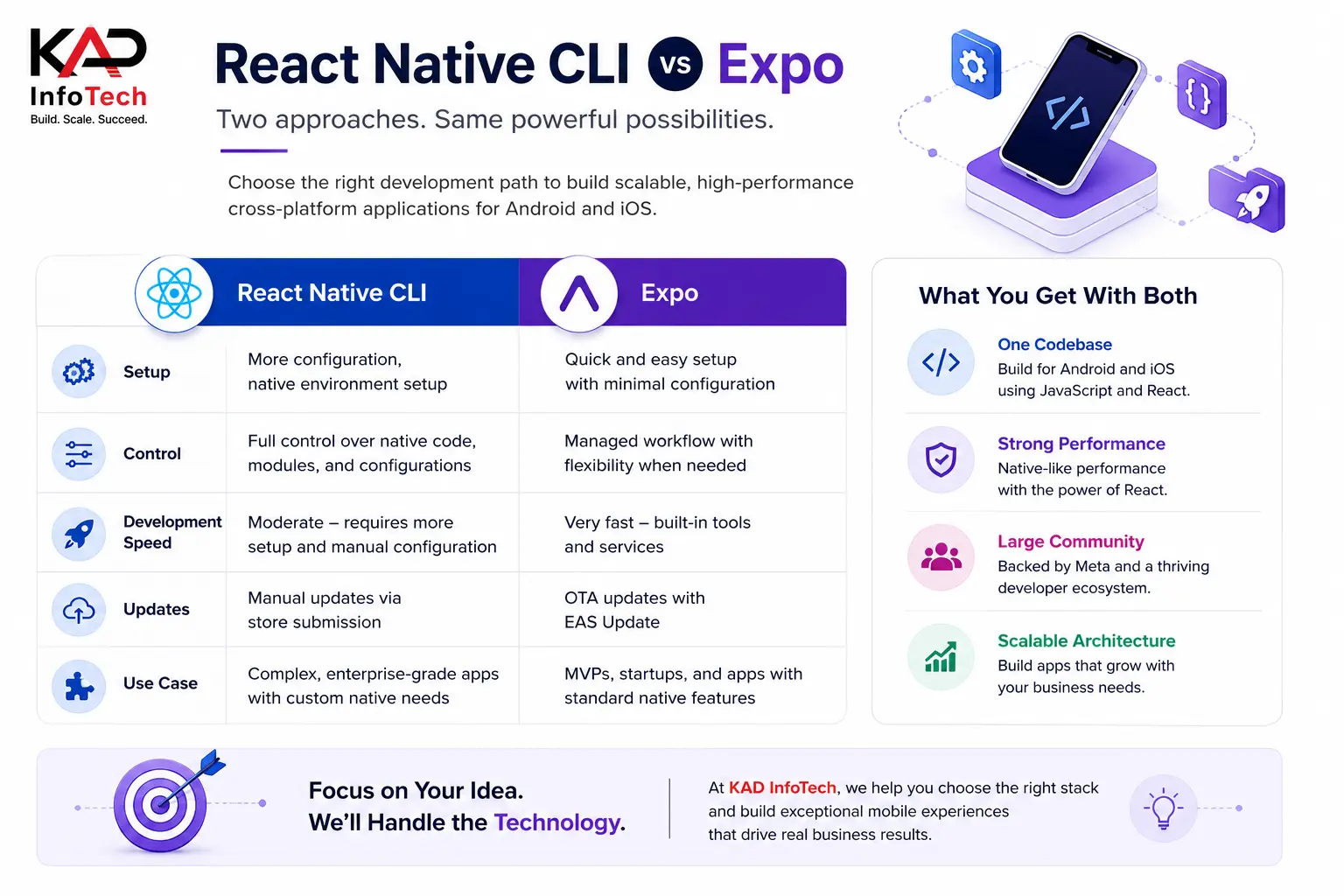
React Native CLI vs Expo: The Fundamental Difference
Although both approaches ultimately produce React Native applications, they follow different philosophies.
React Native CLI prioritizes flexibility and full control. Developers work directly with native Android and iOS projects, making it possible to customize virtually every aspect of the application.
Expo, in contrast, prioritizes developer productivity. It abstracts away much of the native complexity, allowing teams to build applications more quickly with fewer configuration challenges.
Think of the difference this way:
React Native CLI is like building a custom house from the ground up. Every wall, wire, and room can be designed exactly as you want, but it requires more planning, expertise, and time.
Expo is like purchasing a modern modular home with premium features already included. You can move in quickly, customize many aspects, and enjoy a faster setup, although extremely specialized modifications may eventually require additional work.
Neither approach is universally better than the other. The right choice depends entirely on the goals, complexity, timeline, and long-term vision of your project.
Why Businesses Compare React Native CLI and Expo
Technology decisions are no longer made solely by developers. Business owners, product managers, startup founders, and CTOs also evaluate frameworks based on return on investment, maintenance costs, scalability, and time-to-market.
Some of the most common questions businesses ask include:
- Which framework delivers faster development?
- Which option provides better long-term scalability?
- Can the application handle millions of users?
- Which framework reduces maintenance costs?
- Will future feature additions become easier?
- How much native customization is possible?
- Which solution offers better performance?
- Is migration possible if business requirements change?
These questions are valid because the chosen development workflow affects not only the first version of the application but also future updates, integrations, team productivity, and overall operational costs.
At KAD InfoTech, our mobile app specialists evaluate every client’s business objectives before recommending either Expo or React Native CLI. Instead of following trends, we focus on selecting the technology that delivers the best balance between development speed, performance, scalability, and long-term maintainability.
React Native CLI vs Expo: Detailed Feature Comparison
Choosing between React Native CLI and Expo isn’t simply about selecting a development framework. It’s about understanding how each option affects your project’s scalability, development speed, maintenance, security, and long-term business goals.
The table below provides a quick comparison before we explore each aspect in detail.
| Feature | React Native CLI | Expo |
| Setup | More complex | Beginner-friendly |
| Development Speed | Moderate | Very Fast |
| Native Code Access | Full Access | Limited in Managed Workflow |
| Performance | Excellent | Excellent for most applications |
| OTA Updates | Manual implementation | Built-in with EAS Update |
| Custom Native Modules | Unlimited | Supported through Prebuild or Bare Workflow |
| Learning Curve | Steeper | Easier |
| App Size | Smaller (optimized) | Slightly Larger |
| Build Process | Android Studio & Xcode | EAS Cloud Builds |
| Enterprise Applications | Excellent | Good (depending on requirements) |
| Maintenance | More developer responsibility | Simplified |
| Scalability | Unlimited | Very High |
Although this comparison offers a high-level overview, the real differences become apparent when evaluating individual aspects of mobile application development.
1. Development Speed
One of Expo’s biggest advantages is how quickly developers can begin building an application.
With Expo, setting up a new project takes only a few minutes. The framework includes a wide range of APIs and tools out of the box, eliminating much of the initial configuration required in traditional React Native development.
Developers can immediately start creating screens, integrating navigation, testing UI components, and adding business logic without spending hours configuring Android Studio, Xcode, Gradle, CocoaPods, or native dependencies.
This rapid setup significantly accelerates product development, making Expo particularly attractive for:
- Startup MVPs
- Product prototypes
- Internal business applications
- Educational projects
- Small and medium-sized business solutions
React Native CLI, by comparison, requires more initial setup. Developers must install platform-specific SDKs, configure development environments, resolve native dependency issues, and manage separate Android and iOS projects.
While this takes longer initially, the additional setup provides complete control over every aspect of the application.
Winner: Expo
2. Performance
Performance is often one of the first concerns businesses have when choosing a cross-platform framework.
A common misconception is that Expo applications are slower than React Native CLI applications. That may have been true several years ago, but the gap has narrowed considerably.
Modern Expo applications use the same underlying React Native framework as CLI projects. With the adoption of the Hermes JavaScript engine, optimized rendering pipelines, and the React Native New Architecture, both approaches can deliver excellent performance.
For standard applications such as:
- Food delivery apps
- Healthcare platforms
- eCommerce stores
- Booking systems
- CRM applications
- Educational apps
users are unlikely to notice any performance difference between Expo and React Native CLI.
However, React Native CLI still has an advantage when applications require intensive native processing, such as:
- Augmented Reality
- Virtual Reality
- Heavy Bluetooth communication
- Advanced NFC features
- Real-time video processing
- High-frequency sensor communication
- Complex background services
- Hardware integrations
Because developers have unrestricted access to native code, React Native CLI enables more aggressive optimization for resource-intensive applications.
Winner: React Native CLI (for complex applications)
3. Ease of Setup
Setting up a React Native CLI environment involves several moving parts.
Developers typically need:
- Android Studio
- Xcode (macOS)
- Java SDK
- Android SDK
- CocoaPods
- Environment variables
- Native package managers
Each component introduces potential compatibility issues, particularly after operating system or SDK updates.
Expo simplifies this process dramatically.
Developers can install Expo, initialize a project, and begin coding almost immediately. Most common mobile features work without additional native configuration.
This streamlined setup reduces onboarding time for new developers and allows teams to become productive much faster.
For organizations that prioritize rapid product development, this simplicity translates directly into lower development costs.
Winner: Expo
4. Native Module Support
Native modules allow developers to integrate platform-specific functionality that isn’t available through JavaScript alone.
Examples include:
- Custom payment SDKs
- Proprietary hardware integrations
- Enterprise authentication systems
- Biometric libraries
- Bluetooth devices
- NFC communication
- Medical devices
- IoT hardware
React Native CLI provides unrestricted access to native Android and iOS code.
Developers can integrate virtually any native SDK available.
Expo originally had limitations in this area, but recent improvements such as Expo Prebuild and Config Plugins have significantly expanded its capabilities.
Today, many native libraries work perfectly with Expo.
However, React Native CLI still offers greater flexibility when working with highly customized native functionality.
Winner: React Native CLI
5. Over-the-Air Updates
One feature that significantly improves user experience is Over-the-Air (OTA) updates.
Instead of waiting for App Store or Google Play approval every time minor fixes are released, developers can instantly deliver updates directly to users.
Expo makes this remarkably simple through EAS Update.
Teams can deploy:
- Bug fixes
- UI improvements
- Text corrections
- Business logic updates
- Feature enhancements
without requiring users to install a completely new application version.
React Native CLI supports OTA updates as well, but developers generally need additional implementation using third-party solutions or custom deployment strategies.
For businesses that release frequent improvements, Expo offers a much smoother workflow.
Winner: Expo
6. Scalability
A frequent concern among growing businesses is whether Expo can scale as the company expands.
The answer today is largely yes.
Earlier versions of Expo were primarily intended for small applications. Modern Expo, however, has evolved into a mature development platform capable of supporting production-grade applications with millions of users.
That said, React Native CLI remains the preferred option for extremely large enterprise systems requiring:
- Multiple native SDK integrations
- Complex security layers
- Custom background processing
- Proprietary enterprise frameworks
- Deep operating system customization
For most startups and mid-sized companies, Expo provides more than enough scalability.
Large financial institutions, healthcare providers, and enterprise software vendors often choose React Native CLI for maximum flexibility.
Winner: Tie (depends on project complexity)
7. Security
Security should never be an afterthought, especially for applications handling sensitive customer information.
Neither Expo nor React Native CLI is inherently more secure.
Application security depends primarily on:
- Secure authentication
- API protection
- Data encryption
- Secure storage
- Backend architecture
- Access control
- Regular dependency updates
React Native CLI gives developers more flexibility to implement custom security mechanisms directly within native code.
Expo provides secure APIs for many common security needs while simplifying implementation.
For applications involving financial transactions, government systems, or healthcare records, React Native CLI often provides the additional control enterprises require.
For most commercial applications, Expo delivers more than adequate security when implemented correctly.
Winner: React Native CLI (slight advantage)
8. Development Cost
Cost plays a major role in technology decisions.
Expo generally reduces development costs because:
- Faster setup
- Less configuration
- Shorter development cycles
- Simplified maintenance
- Faster onboarding
- Built-in tooling
Businesses launching MVPs or validating product ideas often save both time and money by choosing Expo.
React Native CLI typically requires more development hours due to native configuration, platform-specific debugging, and custom integrations.
However, those additional costs may be justified for applications requiring specialized functionality.
From a long-term business perspective, the right choice depends more on project requirements than initial development expenses.
For straightforward applications, Expo is often the more economical solution.
Winner: Expo
9. Learning Curve
Developers who are already familiar with React generally find Expo easier to adopt.
Its managed workflow reduces complexity and allows developers to focus on application logic rather than native configuration.
React Native CLI requires a stronger understanding of:
- Android architecture
- iOS architecture
- Native debugging
- Build systems
- Package management
- Platform-specific development
Experienced mobile developers often appreciate this level of control, while beginners may initially find it overwhelming.
Organizations hiring junior developers frequently benefit from Expo’s lower learning curve.
Winner: Expo
10. Maintenance and Long-Term Support
Maintaining a mobile application extends well beyond the initial launch.
Regular updates, dependency management, operating system compatibility, and feature enhancements all contribute to long-term maintenance costs.
Expo simplifies much of this ongoing work through its managed ecosystem and cloud-based services.
React Native CLI provides greater customization but places more responsibility on development teams to manage native dependencies and platform updates.
For organizations with experienced engineering teams, this added responsibility is often acceptable.
For smaller teams with limited resources, Expo’s simplified maintenance can be a significant advantage.
At KAD InfoTech, we evaluate each project’s technical requirements, expected growth, third-party integrations, compliance needs, and budget before recommending the most suitable React Native development approach. Our goal is not simply to choose the newest technology but to implement the solution that delivers long-term performance, maintainability, and business value.
Which One Should You Choose?
By now, it’s clear that neither React Native CLI nor Expo is universally better. Both are mature, reliable solutions built on the React Native ecosystem. The right choice depends on your project’s complexity, timeline, budget, and long-term objectives.
Rather than asking, “Which is better?”, businesses should ask, “Which is better for my specific project?”
Let’s look at different business scenarios.
Choose Expo If…
Expo is an excellent choice if your primary goal is to build and launch your application quickly while keeping development costs under control.
It works particularly well for:
- Startup MVPs
- Business validation apps
- Educational platforms
- Appointment booking applications
- Restaurant ordering systems
- Healthcare scheduling apps
- Event management applications
- Internal employee portals
- Small and medium-sized business applications
- Cross-platform apps with standard native features
If your application mainly relies on APIs, authentication, push notifications, camera access, location services, secure storage, and modern UI components, Expo provides nearly everything needed without extensive native configuration.
For many businesses, this translates into a shorter time-to-market, allowing them to collect user feedback sooner and iterate more efficiently.
Choose React Native CLI If…
React Native CLI becomes the preferred option when your application requires extensive native customization or advanced hardware integrations.
It is best suited for:
- Banking and fintech applications
- Enterprise resource planning (ERP) systems
- Telemedicine platforms
- IoT-enabled mobile applications
- Industrial automation solutions
- AR/VR experiences
- AI-powered applications
- Real-time communication platforms
- Custom Bluetooth integrations
- NFC-based payment systems
- Medical device connectivity
- Large-scale enterprise software
These projects often require direct access to native Android and iOS APIs, custom SDK implementations, or performance optimizations that go beyond the capabilities of a managed workflow.
Although development may take longer initially, React Native CLI provides the flexibility needed for highly specialized applications.
Real-World Business Scenarios
To make the decision even clearer, consider these practical examples.
Scenario 1: Startup Food Delivery App
A startup wants to launch a food delivery application with user registration, restaurant listings, payment integration, GPS tracking, push notifications, and order history.
This type of application fits perfectly within Expo’s capabilities.
The business can launch faster, reduce development costs, and continuously improve the product using OTA updates.
Recommended Choice: Expo
Scenario 2: Hospital Management System
A healthcare provider plans to build a mobile application that integrates with hospital equipment, electronic medical records, biometric authentication, and secure enterprise APIs.
Because of the extensive native integrations and strict compliance requirements, React Native CLI is the better choice.
Recommended Choice: React Native CLI
Scenario 3: E-commerce Marketplace
An online marketplace needs:
- Product catalog
- User authentication
- Payment gateway
- Order tracking
- Wishlist
- Push notifications
- Coupons
- Customer support chat
Most of these features are easily supported by Expo.
Unless highly customized native integrations become necessary, Expo offers an excellent balance between speed and functionality.
Recommended Choice: Expo
Scenario 4: Smart Home Application
A company develops smart home devices controlled through Bluetooth and Wi-Fi communication.
Since the application must interact directly with hardware and custom device protocols, React Native CLI offers greater flexibility.
Recommended Choice: React Native CLI
Common Mistakes Businesses Make
Selecting a development framework without understanding future requirements often leads to unnecessary costs and delays. Here are some of the most common mistakes businesses make:
Choosing React Native CLI for a Simple MVP
Many startups assume that more control automatically means a better application. In reality, they often spend weeks configuring native environments for features that Expo already provides out of the box.
Assuming Expo Is Only for Beginners
This misconception is outdated. Modern Expo supports production-ready applications, cloud builds, advanced routing, and continuous deployment workflows. Many successful commercial applications now rely on Expo for its productivity and reliability.
Ignoring Long-Term Scalability
Some businesses focus solely on launching quickly without considering future growth. Whether you choose Expo or React Native CLI, planning for scalability from the beginning helps avoid costly migrations later.
Overlooking Maintenance Costs
Development doesn’t end after deployment. Ongoing updates, operating system changes, security patches, and feature enhancements all require maintenance. Choosing a framework that aligns with your team’s expertise can significantly reduce long-term operational costs.
The Future of React Native in 2026 and Beyond
React Native continues to evolve rapidly, making it one of the strongest choices for cross-platform mobile development.
Several advancements have strengthened the ecosystem in recent years:
- Improved New Architecture adoption
- Faster rendering through Fabric
- Better native interoperability with TurboModules
- Hermes engine performance improvements
- Stable Expo Router
- Enhanced EAS Build and EAS Update services
- Improved TypeScript support
- Better compatibility with modern Android and iOS versions
- Growing ecosystem of third-party libraries
These innovations enable developers to build applications that are faster, more scalable, and easier to maintain than ever before.
As businesses increasingly prioritize faster release cycles and reduced development costs, React Native is expected to remain one of the leading frameworks for cross-platform app development.
Why Choose KAD InfoTech for React Native App Development?
Building a successful mobile application requires more than choosing the right framework. It requires strategic planning, user-focused design, scalable architecture, and experienced developers who understand both business objectives and technical challenges.
At KAD InfoTech, we specialize in delivering custom React Native applications tailored to each client’s unique requirements.
Our team helps businesses:
- Analyze project requirements before development begins
- Recommend the most suitable approach—Expo or React Native CLI
- Design intuitive, user-friendly interfaces
- Develop scalable cross-platform applications
- Integrate secure APIs and third-party services
- Optimize application performance
- Perform rigorous testing across Android and iOS devices
- Provide ongoing maintenance, updates, and technical support
Whether you’re launching a startup MVP, modernizing an existing application, or building a large-scale enterprise solution, our developers focus on delivering high-quality mobile experiences that support long-term business growth.
Frequently Asked Questions (FAQs)
Is Expo better than React Native CLI?
Neither option is universally better. Expo is ideal for rapid development and standard mobile features, while React Native CLI offers greater flexibility for applications requiring advanced native functionality.
Can I switch from Expo to React Native CLI later?
Yes. Modern Expo supports migration through Expo Prebuild, making it easier to transition to a more customizable workflow if your project requirements evolve.
Does Expo support production applications?
Absolutely. Expo is widely used for production-ready mobile applications and offers robust tools such as EAS Build, EAS Update, and Expo Router to support modern development workflows.
Which option provides better performance?
For most business applications, both Expo and React Native CLI deliver comparable performance. React Native CLI has an advantage only in highly specialized applications requiring intensive native processing or custom hardware integrations.
Which framework is more cost-effective?
Expo generally reduces development costs due to its simplified setup, built-in APIs, and faster development cycle. However, React Native CLI may offer better long-term value for projects with complex native requirements.
Is React Native still worth learning in 2026?
Yes. React Native remains one of the most popular and actively maintained frameworks for cross-platform mobile development, supported by a large community and continuous improvements from Meta and the open-source ecosystem.
Final Verdict
When comparing React Native CLI vs Expo, there is no one-size-fits-all solution. Both frameworks have matured significantly and are capable of powering high-quality Android and iOS applications.
If your priority is rapid development, lower costs, and faster deployment, Expo is often the ideal choice. It simplifies the development process while providing powerful tools for building modern cross-platform applications.
On the other hand, if your application requires deep native integrations, custom hardware support, or enterprise-level flexibility, React Native CLI remains the preferred solution. Its unrestricted access to native code makes it suitable for complex, feature-rich mobile applications.
The most effective decision comes from understanding your project’s current needs while planning for future growth. Choosing the right development approach from the beginning can reduce maintenance costs, improve scalability, and accelerate long-term success.
At KAD InfoTech, we help businesses navigate these decisions with confidence. From technology consulting and UI/UX design to full-cycle React Native development and post-launch support, our team delivers scalable mobile solutions that align with your business goals. Whether you choose Expo or React Native CLI, partnering with experienced developers ensures your application is built for performance, reliability, and future expansion.